My name is Kenneth and I write cool Mac and iPhone software. This is my personal weblog where I post about stuff I find interesting. I usually write about Mac development, the business of shareware and the Mac community in general.
read more →Introducing Econ, the screensaver that uses your icons!
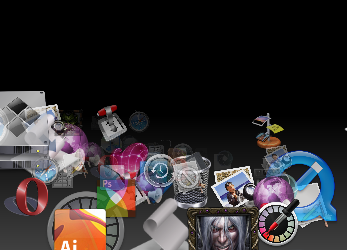
Note: This screenshot is UGLY. Screen capture just wouldn’t capture a smooth image…
Click on the screenshot to get a nice QuickTime preview of the screensaver.
Econ is Leopard-only and requires a decent graphics card & CPU.
Download Econ
Update: In Snow Leopard, you need to launch System Preferences in 32-bit mode in order to be able to select Econ from the list of screensavers. To open System Preferences in 32-bit mode, right-click on its icon, choose Get Info and check the Open In 32-bit Mode checkbox.
This entry was posted on Monday, November 19th, 2007 at 4:28 pm and is filed under Apple, Interface, Uncategorized. You can follow any responses to this entry through the RSS 2.0 feed. You can leave a response, or trackback from your own site.
Add your thoughts!
good job. Just that some of my icons not shown in it.
[…] un vortice delle icone delle applicazioni che ciascuno possiede dentro il proprio Mac. Econ può tornare utile a tutti coloro che si sono stufati degli screensaver presenti di defaut nel […]
[…] [Download @SeoLog] […]
[…] un vortice delle icone delle applicazioni che ciascuno possiede dentro il proprio Mac. Econ può tornare utile a tutti coloro che si sono stufati degli screensaver presenti di defaut nel […]
If it scanned ~/Applications as well as /Applications i’d love it.
This is really interesting
This screensaver is chibby !!!
I hope You’ll do it for Tiger ;-)
This cute screensaver will surely never be available for Tiger, as I suppose it uses Core Animation which is only available for Leopard.
[…] applications’ icons! Econ is Leopard-only and requires a decent graphics card & CPU. Website Download Econ These icons link to social bookmarking sites where readers can share and discover […]
Nice saver, I like it thanks. Sometimes I forget just how many little apps I have dotted around that I am never using.
One question though, how do you manage to grab a shot of the screensaver before it drops back to the desktop?
@Louis: there’s two ways:
- Timed screenshot (grab.app can do this)…
- Video recording of the screen (Snapz Pro X or iShowU can do this). This is the best way. You can then extract a still from the video with QuickTime Pro
Thanks
[…] vorenthalten. Wer es also etwas bunter auf dem Bildschirm mag und Leopard einsetzte, der kann sich Econ mal […]
[…] nette Bildschirmschoner: Econ bedient sich der Icons aus dem Applications-Ordner. Moodsaver zeigt farblich die Auslastung des […]
[…] nette Bildschirmschoner: Econ bedient sich der Icons aus dem Applications-Ordner. Moodsaver zeigt farblich die Auslastung des […]
just to let you know, a screensaver that did exactly this - presenting smooth flying random icons of your installed Apps -
is included in Mac OS X 10.1 (Puma) - it stays there until 10.1.5, but it gets erased after the Upgrade to X 10.2 Jaguar.
That screensaver in Puma, it is 100 % copyrighted and made by Apple, it looks EXACTLY like your screenshot, but runs on any Ati Rage Card with only 16 MB Vram, which were common back in 2001.
I would call this Project a shameless ripoff and I will imediately notify Apple to compare this with the screensaver they have made, which was and still is their intellectual property.
OS X ( even the very first Beta ) is not anbandonware which one can rip,copy or modify or implement old features into newer editions by claiming that it is “something new”.
Good Night from Germany.
[…] viele Programme auf seinem Mac installiert hat, für den ist vielleicht der Econ-Screensaver eine interessante Alternative. Die meisten Programme kommen ja mit teils sehr […]
[…] « Emerging Hotties of 2008 21.04 Screensaver uses your icons […]
Hi Kenneth,
I installed Econ.saver. Nice! I would like to have influence of speed, number of icons a.s.o. Something in the pipeline?
Greetings from Berlin, Germany
[…] this video clip and many (but not all) are free, including AlphaBabySaver, Big Time Screen Saver, Econ, and […]
Sascha wrote:
“just to let you know, a screensaver that did exactly this - presenting smooth flying random icons of your installed Apps -
is included in Mac OS X 10.1 (Puma) - it stays there until 10.1.5, but it gets erased after the Upgrade to X 10.2 Jaguar.
That screensaver in Puma, it is 100 % copyrighted and made by Apple, it looks EXACTLY like your screenshot, but runs on any Ati Rage Card with only 16 MB Vram, which were common back in 2001.
I would call this Project a shameless ripoff and I will imediately notify Apple to compare this with the screensaver they have made, which was and still is their intellectual property.”
You neglect, of course, the fact that a flying icon screensaver like this is much older than OS X. So it’s not really “Apple’s IP” even though they did offer an implementation several years ago. It’s so old and so obvious that it’s not really ownable.
@Sascha - Geez, calm down. It is not exactly the same. The one for 10.1 was actually quite lame.
[…] Econ Econ Screensaver […]
[…] Econ […]
[…] Econ […]
[…] Econ […]
[…] Voor meer informatie en download: http://www.seoxys.com/econ-2/ […]
[…] ?????? AKPC_IDS += "1716,"; […]
[…] Econ […]
[…] Econ […]
[…] August 13, 2009 Reviews > , Software Leave a Comment Tags: Privacy Available from http://www.seoxys.com/econ-2/ whilst a nice enough screensaver, for the paronoid amongst us – do you really want every […]
[…] 3. Econ […]
No source code sucks.
Hi,
Will you be updating this amazing screen saver to Snow Leopard compatility?
thank youuuuuuuu for this awesome screensaver. And for Mario’s comment: It works like a charm on my Snow Leopard.
I can’t run this in Snow Leopard, so I hope you’ll soon be doing a new version - it looks great!
Sonia, you’re lucky. I can’t get to install the screen saver.
I mean, it install but when I choose it on the pref panel I get a message “You cannot use the Econ screen saver on this computer”
Contact the developer of this screen saver for a newer version.
Cancel Move to Trash.
Have you done something to make this work?
Mario open system preferences in 32-bit mode. But a 64-bit option would be nice.
In Snow Leopard, you need to launch System Preferences in 32-bit mode in order to be able to select Econ from the list of screensavers. To open System Preferences in 32-bit mode, right-click on its icon, choose Get Info and check the Open In 32-bit Mode checkbox.
Any chance this will be updated for Snow Leopard so that it can run in full 64 bit?
Thanks, CJ
[…] Econ […]
[…] Econ […]
[…] in seconds (http://www.doubletwist.com/dt/Home/Index.dt) Econ – Screensaver using your icons (http://www.seoxys.com/econ-2/) LightSpeed – Point of Sale software (http://www.xsilva.com/launch_2.5.php) macFuse – […]
[…] Econ […]
[…] Econ […]
Hey, I love this! Thanks.
Thanks, for that screensaver!!!
Umm… when I click the download link, it goes to some sort of random website that has nothing to do with this thing. An no download. Please email downloaded file!
I love this! Thanks
I love this thank
Just beautiful. Thanks so much :)
[…] Econ by Kenneth Ballenegger […]
I love this thank
[…] Econ […]
[…] Econ: Econ gathers icons from your /Applications folder and sends them flying at you, kind of like those classic space travel screensavers, but with icons. My screenshot of this one came out terrible, but it looks a lot fancier in person. […]
i very love this screensaver, but can’t use my mac on osx10.6, have a newer ver. ? Thanks!
this still wont work with Snow Leopard 10.6.8, any ideas?
love
it’s nice, but i wish i could customize the speed and number of icons. also, it doesn’t seem to load all the icons.
Could you make the Econ screensaver for Mac OS X 10.7 Lion? I would love to have it on my MacBook Pro.
Hello, econ looks pretty sweet. Unfortunately, it seems that Snow Loepard and Lion require a 64 bit version. Any chance you could compile a 64 bit version and release it?
Hi Kenneth, any chance you could update this to run on Lion/Mountain Lion?
I run Leopard, and copied the saver into the library/screen savers, but when I go to sys. prefs, and screensavers then click on the econ one, sys. prefs quits unexpectedly.
In looking at all the above comments, I’m really puzzled as to why you’ve *yet* to create a version of tis that’s fully compatible in 64-bit, with Lion and Snow Leopard. I mean, wow, if *I* had a bunch of people who really wanted something I’d created, I’d bend over backwards to deliver. How hard can it be, man? I mean, seriously? Also, ever seen or heard of “Flying Icons” for the Mac? Screensaver from years ago? Damn, if only that still worked…
Hi Kenneth, yes a version for 10.8 would also be good. A lot more mac users have come on board since the success of iPhone and the latest is Mountain Lion.
it says i need to download an updated version, says it’s last modified in 2007. Help please???
i also have mac v. 10.6.8. screensaver says its too old. :(:(:(:(
Have something to say?