My name is Kenneth and I write cool Mac and iPhone software. This is my personal weblog where I post about stuff I find interesting. I usually write about Mac development, the business of shareware and the Mac community in general.
read more →Update: This tutorial is obsolete. Check out the nifty Mac application I made that does all of this for free and without hassle: Warmonger
To all those who are heavy Warcraft III players, this is for you. This tutorial will show you how to set up an autorefresh bot, so that you do not have to open and close slots manually every time you host a game. (it can be very tiring)
Download The Software
To start you need to download this windows (.exe) autorefresh: Click here
(This fileis a zip archive. Since it’s missing the extension, you might have to change its same to something.zip and then unzip it.)
Next you need to download the mono framework: Click here (warning: big download: ~50MB)
Installation
Mount mono’s disk image and install the framework using the installer package inside.
Now check wether you have X11 by searching for it in the /Applications/Utilities folder. If you already have it, you can skip to the next section. Otherwise, you need to install it from the Mac OS X install disc. Insert your Tiger disc. You then need to scroll down:

Open “Optional Installs”

Now check only the X11 row and proceed with the installation

Setting up
Unzip Warcraft3AutoRefresh.zip and open the folder you just unzipped. Now open Terminal.app (you can find it in /Applications/Utilities) and type “cp ” (do not forget the space after “cp”) and then drag Warcraft3AutoRefresh.exe to the Terminal window.

Now, type ” .autoref.exe” and press return (don’t forget the space before ”.autoref.exe”)
You can now exit Terminal. Open X11 (you can find it in /Applications/Utilities). Go to application menu and choose “Customize Menu…”
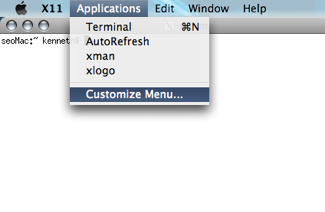
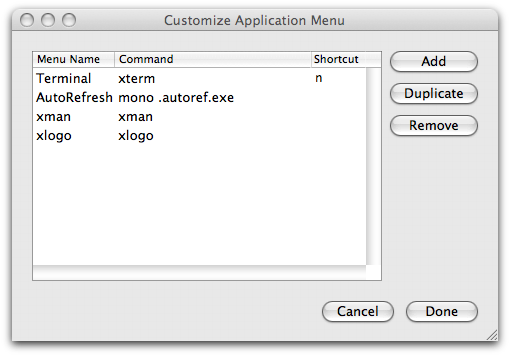
In the window that pops up, click add, then double-click on the new item’s “Menu Name” column and set it to something like “AutoRefresh” (it doesn’t actually matter what it is, it’s your choice). Next edit the “Command” for it and set it to “mono .autoref.exe”.
Usage
Now everything is set up, well done! Now, when you want to use autorefresh, just open X11, and choose “AutoRefresh” from the Applications menu. (Obviously, it will only work when you’re hosting a game on BNet)

Update: download link for autorefresh fixed, thanks VoltmanEXE!
Update 2: forgot to mention that the downloadable file for the autorefresh is a zip archive. Since it’s missing the extension, you might have to change its same to something.zip and then unzip it.
This entry was posted on Monday, October 8th, 2007 at 4:08 pm and is filed under Articles, English, Gaming, Internet. You can follow any responses to this entry through the RSS 2.0 feed. You can leave a response, or trackback from your own site.
Add your thoughts!
Dude, you’re awesome. I couldn’t figure out that mono framework on my own. Thanks for the instructions.
By the way, the link to the Auto Refresh program itself is dead, or at least it was for me. Luckily I knew a place that had it. If you need a new link, here’s where I got it: http://www.hiveworkshop.com/resources_new/tools/download/466/WarcraftIIIA
Thanks again, VoltmanEXE
i don´t know why but if i download the programm i don´t have a .exe???
hey, it’s a .zip file… you have to uncompress it… you might have to rename it to something with a .zip extension for it to work.
yo dude how do u run war craft windowed
Easy, press Cmd-M (apple key and M key).
i installed X11, followed all of your instructions. Opened terminal and entered in the correct coding. i closed terminal and opened X11. When i did, autoref wasnt under applications.
I realized what i did wrong. I did al the “Custom Menu” stuff, and then clicked done. I went to open up AutoRefresh from the menu but nothing happened. Please help.
if you open terminal and type “ls” does “.autoref.exe” show up in the list? because if it doesn’t, you probably didn’t copy it properly…
it only works on leopard or tiger too?
(cause it don’t works with me ^^ and the only differance
come from the differance of the terminal’s looks)
i’m sorry for the grammar fault , i’m french :p
it’s ok, it works
thx a lot
you are french too, aren’t you?(you speak frenche on the
last screen with X11 ^^)
it works on Tiger for sure (this tutorial was done in Tiger, even though it was skinned with shapeshifter to look like Leopard). I haven’t had the chance to test it on leopard yet.
PS: Yeah, I speak french… i’m swiss actually
hi. this doesent work for me… i cant open the files, can you please help me?
@marius: “This file is a zip archive. Since it’s missing the extension, you might have to change its same to something.zip and then unzip it.”
ok. i’ll try^^ hope it works now ;P
where do i get zip?
when i put the File : WarcraftIIIAutoRefresh.exe into Terminal and then type .autoref.exe it says it bashes because it cant execute binary file. please help. Thanks much =]
nevermind, i realiced i didnt put the “cp” before it. but when i finished everything, and still tried to load the autorefresher through X11 it didnt do anything. contact me at Jakelahr7097@mac.com or reply back on here. thanks
i need a program to open the file with……wgat do i need???
Just rename this file http://www.hiveworkshop.com/resources_new/tools/download/466/WarcraftIIIA to warcraft.zip and unzip it with the system.
@Jake: if you type mono ~/.autoref.exe in the XTerm window in X11, what happens?
and?? i need a file……….i cant open it yet, i have allready dl it
ok i understand now..
The file is prtected omg.. tell me it maby it will work. pass:….
HI. Kenneth… i cant install b4 i get the password to open, cause the file is corrupted.
i mean it it is protected…
whoho! it works! thank you very mutch for this dl ;P
Dude i cant still gives me connection error
hi. im on a mac and i cant host warcraft 3 games. could u help me out?
This tutorial is to show you how to set up an autorefresh for mac for a working Warcraft3. I’m not here to fix your warcraft, call blizzard support for that.
That said, you’ve got to forward ports. Google that.
Hey thanks for writting this tutorial but…
when I do ls I get this
Desktop Movies Sites
Documents Music dominions2
Downloads Opera 7 Preferences.new notoolbar.htm
Incomplete Pictures
Library Public
when I type mono ~/.autoref.exe in x11
Cannot open assembly /Users/chris/.autoref.exe.
So im guessing I didn’t copy it correctly.
Heres what happens as I follow the first portion of your directions:
Chris-Nayaks-Computer:~ chris$ cp
usage: cp [-R [-H | -L | -P]] [-f | -i | -n] [-pv] src target
cp [-R [-H | -L | -P]] [-f | -i | -n] [-pv] src1 … srcN directory
Chris-Nayaks-Computer:~ chris$ /Users/chris/Desktop/WarcraftIIIAutoRefresh\ Folder/WarcraftIIIAutoRefresh.exe .autoref.exe
-bash: /Users/chris/Desktop/WarcraftIIIAutoRefresh Folder/WarcraftIIIAutoRefresh.exe: cannot execute binary file
Chris-Nayaks-Computer:~ chris$
Just figured out that cp through .autoref.exe should be in one line(not hitting return after each bit)
still wont work though.
got it
much thanks
hey m8 that was so helpful ive been looking for one or how to use one for ages, do u think this could work with custom kick too.
Thanks SOOOOO much u are the greatest :P
What would i type for Banlist (instead of ” .autoref.exe) can u help me figure that out… because im trying to get banlist to work that way too.. I got autoref working.. but now I want Banlist lol…
Oh Yeah you migth wanna change the tutorial where it says to Type in ” autoref.exe” because when you enter the program it already puts a space.. thats what completely through me off.. so tell them that even though there is a space after the program u just enetered u still have to add one.
Once again what do i type for the path for banlist ( instead of ( .autoref.exe)
Thanks Cheesytoe
@Cheesytoe: this only works with autorefresh unfortunately… I haven’t myself found a way to run banlist on the mac. If I do, I’ll write another separate tutorial for it.
Ok thanks, =’( im really bummed because its horrible playing vampirism without custom kick and banlist lol…. people move in and you cant kick them, because someone else was picked host lol… it sucks but i guess ppl just dont wanna make it for mac lol..
@Cheesytoe: I couldn’t agree more…
Oh Yeah you might wanna change the tutorial where it says to Type in †autoref.exe†because when you enter the program it already puts a space.. thats what completely through me off.. so tell them that even though there is a space after the program u just enetered u still have to add one.
Because i spent days trying to figure out what i did wrong… so if you can try to change it to say “when iyou add the program it will already create a space but you have to put another space too.”
(sorry if i said it twice… its just that most ppl wont read down this far to find out what they did wrong)
I’m not sure I got what you’re talking about… where exactly does that happen?
what i meant was that when you type in cp (then drag in the file) *then you type a space*, but when you dragged in the application it already put a space after you dragged it in… but i thought (oh it already put a space in i dont need another space before .autoref.exe) and it didnt work… until i tried 2 days later after almost giving up, and i typed in another space… so that completely confused me lol
does this work on panther(10.3.9) ?
@JIM: I haven’t tested it, but it should.
@Cheesytoe: I don’t understand what went wrong with your. One or two space should make no difference. (unless you put a space in quotes)
hmm dude i tried everything but when i choose the autorefresh in x11 after doing what u said it still doesn’t show up when i host games. I dont see any sign of autorefreshing, how can i tell if its working, will all the slots open and close, and what is that window there in the last photo of ur tutorial wher it says warcraft iii autorefresh, i dont see it. contact me deathclash1@gmail.com
@Banky: That window is the autorefresh program. If it’s not running, obviously your game won’t autorefresh. You must’ve done something wrong somewhere along the line. Try it again following the instructions exactly to the letter until you see that window.
How do i make it so that this auto refresh happens at the same time instead of 1 at a time
When you put in “mono .autoref.exe” you must have a space between mono and the dot otherwise it won’t work. I had the same problem and it was solved when i did that.
Have you found the way to run banlist on mac? I’m desparatly wanting to host dota games but I dont have banlist.
@Cosmic: it should refresh all at a time… They only start leaving once it’s full, so it actually does refresh properly.
@Gooner: Yes, indeed. Looks like “mono .autoref.exe” might be hyphenated, resulting in confusion. Actually there is a space between the two in my article…
@Roger: As I said before, nope… So far there’s no way (that I know of) to run banlist on mac. Trust me, if there was, I’d have made a tutorial on it by now. :)
Thanks for the tut. It works fine for me ^^. And something about WC3BL>> It requires WinPcap to run. Also, the .exe that you DL from the site is the installer and expands into WinPcap and BL. I’m transferring the files from Virtual PC to my Mac and I will try to run it in X11.
And, do you have to type .autoref.exe or can you type like .autorefresher.exe? Because if it has to be a certain way, I don’t think how to make BL work.
i cant install x11… it says either my machine has a newer version or this machine doesnt require this update… ??? im using 10.4.11. but i cant find x11 in utilities. is it named differently?
nvm, i found a ftp mirror to downlaod the correct version… how do i change the name of the autorefresh? (the fake players name)
In the “File” menu of the autorefresh program, there should be a “Preferences” item or something similar. That’s were you can set this setting.
How do u unzip it? WIth wat program?
@bpb: Mac OS X has the ability to unzip built-in.
The link to the mono framework isn’t working on both ur link and the site’s link…
Hey. Liked the tutorial. Is there a way to get X11 if you don’t have your Tiger disk anymore?
Found it. You can download X11 from the Apple website, here: http://www.apple.com/support/downloads/x11formacosx.html
I’ve followed all the steps yet when I try to select autorefesh from the drop down in X11 nothing happens. If I instead type in mono autoref.exe I get Cannot open assembly autoref.exe.
Ah I re-read the comments and using mono ~/.autoref.exe in x11 work.
ty for this i was just wondering is there a apple or mac compatable banlist around somewhere if so can u email the address fo it to cranky13aker@hotmail.com and the email is a 13 not a B ty for that
x11 does not show under my applications/utilities folder. Terminal is there. I downloaded x11 from mac site and when i try to install it says that there is newer software already installed on this volume.
What do I do?
Hi, I did everything step by step and when i go to x11 and try running the application nothing happens.
i installed everything and followed the instructions exactly but still nothing happens when i run autorefresh out of x11. i noticed that autorefresh.exe is viewed by my mac as a plain text document, is that the problem? also is there a way to verify that mono framework is properly installed? i suspect it might not be, but i don’t know why. thanks.
ok, I downloaded the WarcraftIIIAutoRefresh and changed the .exe file into a .zip file. But when I clicked on it it showed
Unable to unarchive “WarcraftIIIAutoRefresh.zip” into
“WarcraftIIIAutoRefresh”.
(Error 1 - Operation no permitted.)
please help me!!
LOL i see kenneth can handle well with macs.. xD using some funny tricks on finder^^ for the ones who cant host.. youre right PORT FORWARD
Good Job kenneth Switzerland FTW!
Does this not work in Leopard? I’ve tried everything I can think of, it appears to not be copying the .exe at all. I will type + drag everything as stated above exactly then type “ls” and the .autoref.exe won’t appear. Please let me know if anyone else has got this working in leopard. Thanks homies.
Jared I have the same problem. My suspicion is that the mono framework isn’t installing correctly but that’s entirely conjecture. Hopefully Kenneth can help us out.
Hey,
I can’t get the X11 file. I’m on Mac OS X 10.4.11
and like other people said I can’t download the
X11 because it says “This update is not needed.”
Yet, there is no X11.app in my utilities folder. I’ve
searched all over and found a bunch of folders titled
X11, but no application. I also checked the Install Disc
and only found X11 SDK, i must have a different install
disc or something, because there is no X11 on it. Any
help would be greatly appreciated.
Thanks, Colin
got it.
had to download it from a random site - seems they don’t have that app anywhere anymore. :(
Hey just wanted to say thanks a lot for figuring this out and making it easy to do. Next project is working on the banlist!
okay… now I can’t host games at all. They are not viewable again by others now that I’ve installed autorefresh. I can’t host at all now, even without it. Please help -duder
@Duder: weird… you should check your firewall settings… you need to forward ports…
@collin: yeah X11 is hard to find on the net, but it should be on your Install DVD…
@Jared & dc: Updated version for leopard coming soon ASAP
ASAP
Hey guys, I’m using Leopard and I just got the refresher to work. I just put the file “WarcraftIIIAutoRefresh.exe” in my home folder. Then in X11 in the application window, I put the command field to “mono WarcraftIIIAutoRefresh.exe” and it runs just fine.
Hope this works for everyone else.
@Adam: Yes I also got it to work. The command field in x11 is “.mono WarcraftIIIAutoRefresh.exe”, and in terminal I typed ” .WarcraftIIIAutoRefresh.exe” where kenneth says to put ” .autorefresh.exe”. I guess this has to match whatever you enter into x11. But yeah, it worked.
Hey i’m having a problem.
i got X11 and mono and that.
i followed you directions and when i run AutoRefresh (under X11 menu: Applications/Autorefresh) nothing happens.
I also tried dc and Adam’s tips and still nothing appears on my screen. i typed ‘ls’ and WarcraftIIIAutoRefresh.exe was there.
thanks :)
it was the port forwarding :X my bad. It seems my IP address changes about once a day somehow… either way autorefresh works great! please find a way to get ping/country check!!!
what do we have to do differently for leopard i did what it said for tiger hoping it might work it doesnt do anything when you run it from x11 what do you have to change?
Oh my, thank you so much! I made a really stupid mistake at first. I just mounted the mono framework, and didn’t install it. After I did that, it worked like a charm. Now about that blist hehe…..
Thanks again! Gary
ok, I downloaded the WarcraftIIIAutoRefresh and changed the .exe file into a .zip file. But when I clicked on it it showed
Unable to unarchive “WarcraftIIIAutoRefresh.zip” into
“WarcraftIIIAutoRefresh”.
(Error 1 - Operation not permitted.)
please help me!!
does this only work on MAc PC;s?
@lost: this is for Mac users. if you’re using Window, there’s plenty of tutorials for that. google it. :)
hey uh, i typed mono ~/.autorefresh.exe in X11 and it says that it cannot open assembly
also i couldnt get any of your download links to work, so i snatched my friends working auto, and i got mono and source off their websitee,
on top of all that i am on a leopard mac, idk what to do
I couldnt get shit to work, I followed all of the above Leopard comments, nothing worked, so I thought fuck it.
Then I simply typed ‘mono WarcraftIIIAutoRefresh.exe’ into terminal.
VOILA! Hello autorefresh. Woot.
Well, it WAS working perfectly, but now I keep getting a bunch of errors showing in terminal and it shits out on me, and mono crashes.
Eh, lol at my 3-hit-combo with comments, but I fixed it. The shitting out was if I tried to set a custom name without clicking NEW NAME and then clicking in the white window to the left first, the crash was mono trying to render whatever autorefresh is supposed to render graphically, and it failed. Also you can type ‘mono WarcraftIIIAutoRefresh.exe’ into X11 instead of terminal and it works the same, or you can leave X11 closed, either way it works.
hi i followed all the directions and when i go to the menu and click on autorefresh nothing happens….whats wrong???? do i have to do something with that mono framework or what??? help please
whenm i type .autoref.exe in there it says cannot execute binary file why?
woot i got it thanks a lot dude you rock!!! i hope you get the banlist working!
[…] SeoLog » Blog Archive » Tutorial: Warcraft III Autorefresh for Mac This tutorial will show you how to set up an autorefresh bot, so that you do not have to open and close slots manually every time you host a game. […]
hey could i propably do somethin like this to run lancraft too? plz reply to this…
Yo i folowed all of your instructions entered all the correct codes. i dled the mono framework 1.9.something, put botht he icons into my hardrive applications folder and ran the installer. yet when i click on the autorefresh up in the x11 applications list nothing comes up. what should i do?
What’s the username/password to download the mono framework? Thanks
I need help opening X11. I have it downloaded but every time I try to open it nothing happens. >HELP ME<
bash-3.2$ cp
usage: cp [-R [-H | -L | -P]] [-fi | -n] [-pvX] source_file target_file
cp [-R [-H | -L | -P]] [-fi | -n] [-pvX] source_file … target_directorybash-3.2$
WarcraftIIIAutoRefresh.exe file not found
I’m trying this on Leopard, tried what was written previously, and still can’t get it to work.
Any insights? Thanks
Last login: Thu Jun 5 09:24:20 on ttys000
Macintosh:~ jovanjoshlee$ cp
usage: cp [-R [-H | -L | -P]] [-fi | -n] [-pvX] source_file target_file
cp [-R [-H | -L | -P]] [-fi | -n] [-pvX] source_file … target_directory
Macintosh:~ jovanjoshlee$ /Users/jovanjoshlee/Downloads/WarcraftIIIAutoRefresh/WarcraftIIIAutoRefresh.exe .autoref.exe
-bash: /Users/jovanjoshlee/Downloads/WarcraftIIIAutoRefresh/WarcraftIIIAutoRefresh.exe: cannot execute binary file
Macintosh:~ jovanjoshlee$
when i type .autoref.exe in there it says cannot execute binary file why?
Macintosh:~ jovanjoshlee$ MONO WarcraftIIIAutoRefresh.exe
Cannot open assembly WarcraftIIIAutoRefresh.exe.
kenneth plz help
i am ?? fyi
F.Y.I. I AM ”??”
I’ve got mono framework 1.9 installed.
I run War3, make a custom game.
I open X11, navigate to the folder that contains the windows executable.
I run bash$: mono WarcraftIIIAutoRefresh.exe
Nothing at all happens. I can post the output of
mono -v WarcraftIIIAutoRefresh.exe, if that would help. It’s quite a large log, even if I force break after 2 seconds.
Method (wrapper runtime-invoke) System.Object:runtime_invoke_void_string (object,intptr,intptr,intptr) emitted at 0x100c028 to 0x100$
Method System.OutOfMemoryException:.ctor (string) emitted at 0x100c168 to 0x100c1c0 (code length 88) [.autoref.exe]
Method System.SystemException:.ctor (string) emitted at 0x100c1d8 to 0x100c230 (code length 88) [.autoref.exe]
Method System.Exception:.ctor (string) emitted at Here’s a few of the lines:
[.autoref.exe]
Method System.Exception:set_HResult (int) emitted at 0x100c280 to 0x100c2b0 (code length 48) [.autoref.exe]
Method System.NullReferenceException:.ctor (string) emitted at 0x100c2b0 to 0x100c304 (code length 84) [.autoref.exe]
Method System.StackOverflowException:.ctor (string) emitted at 0x100c308 to 0x100c344 (code length 60) [.autoref.exe]
Nevermind — got it working.
For some reason, it took a good 5 minutes before it finally started up. Now it starts up faster.
I’m not on a slow machine, either. Strange.
i also cant seem to get this right… could someone help me? i also dont know if i should zip the exe..
Hey when I tried to enter the info in the terminal I got “permission denied”
@someon1 that same thing happened to me at first … it took so long i thought it was broken, and now it takes like 3 secs. Also kenneth, hope ur workin on a blist right now :D
I get cannot execute binary file
how do I stop this… I see previous people have had this problem then suddenly corrected it - although did not mention how :(
I’ve tried everything, and it doesn’t work.
I installed X11, opened Terminal, typed cp , dragged the WarcraftIIIAutoRefresher.exe into Terminal and typed .autoref.exe and hit enter.
Nothing showed up on X11. How do I fix this?
Its not working im 99.9% sure i did it all right but its still not working. can u help plz. my e-mail is dragrace326@aol.com let me kno there
I am confused i did everything you said typed all the terminal stuff but i go to applications in X11 and click on autorefresh but nothing happens. (the game is running aswell) So i do what to said to do type “mono ~/.autoref.exe” and it says “Unhandled Exception:…..” i have no idea what any of it means. Help would be apreciated.
for me it worked all in one line..
cp_(draged app.)__.autoref.exe
_ 1 space __ 2 spaces
I never got a install disc for my mac so how do i get x11?
I dont know what is happenning but i feel like i wasted more time trying to install this than reshing slots in warcraft. i cant even drag the folder like u do in your explanation…. plz help me.
Does this auto ref works on leopard 10.5 for mac?
@Hallee and anyone else who asked if it works on Leopard: it does. I have tested it, and it works flawlessly.
Tks for telling me that. But,when i click the link to download monoframe, “click here” the sever said that it had failed to open the page, is there another way to download the software?
Download the latest version on mono-project.com
Hi Kenneth,
I followed all your instructions and did wad u said, but when i start X11 and went to applications and select AutoRefresh, the window did not pop up. Plz help me tks.
By the way, it may be the installing of the monoframe work problem, so can i uninstall it, and where can i find it?
Srry, i realised that the system take a while for the auto refresher to respond. Thanks a lot, i hope to look forward for a mac Banlist! :)
Hi. I downloaded WarcraftIIIAutoRefresh and mono. I don’t know what I’m doing wrong at the terminal part. Here’s the copy of terminal(I am on Leopard).
Last login: Tue Sep 2 17:11:50 on ttys000
johan-naslunds-macbook:~ jnaslund$ cp /Users/jnaslund/Downloads/WarcraftIIIAutoRefresh/WarcraftIIIAutoRefresh.exe .autoref.exe
johan-naslunds-macbook:~ jnaslund$
I can’t find autorefresh in X11 - applications. Help me please :)
Also, I can’t seem to find mono on my computer after i installed it.
I got it FIXED!
I just typed mono .WarcraftIIIAutoRefresh.exe in X11!
Thanks for this very good and unique guide
I’ve done everything (including reinstalling everything 10+ times), and it STILL will not work. Seriously… When I open up X11 there is just 3 things, I made a new one and input the information stated, but it still won’t work. I have all of the downloads…everything…
I’ve downloaded it and did everything it said, but when i click on the Autorefresh under the X11 menu it doesn’t do anything. Any ideas on how to fix it?
guys in first place, how to host on a mac plz!
same as on windows…
Hey Kenneth, thanks for the awesome tut, now I can autorf on my Mac
Oh, and it works on Leopard just fine.
Hi, is me hallee.
For this auto rf i want it to work it on another account too other than my user that i used to install it first. I followed ur steps, but they said it is a directory and cant be done. Must i install monoframework on my the other account to and redownload the auto rf for it to be done again??
Please reply, thanks
For the others which have difficulty with the x11. It is either you type wrongly, or u will have to wait quite some time. It happened to me at first. I tout i cant be fixed, but be patient. If it still does not pop up, u might have done it wrongly.
You shouldn’t have to reinstall mono, but you’ll have to re-do everything that has to do with the autorefresher itself. (All the terminal stuff, and X11, etc.)
Any way to get a Custom Kick to work with this?
After a few days of trying different things, I’ve finally gotten this to work.
The reason it didn’t work in os x 10.3.9 (Panther) is because mono 2.0 is for os x 10.4 or higher.
You need to install an older vr from here: http://mono-project.com/OldReleases
I installed mono 1.1.18 and now I have autorefresh in Panther!
If you already installed a newer mono and are running os x 10.3.9 you need to goto HD > Library > Frameworks > Mono.framework and throw that folder away. That will essentially uninstall mono. Then install vr 1.1.18.
If nothing happens even after you’ve gone through all the steps, then try it again and make sure to put the spaces in the right spots. I’ve followed the steps on this site and aside from needing an older mono everything does work, even in os x 10.3.9.
If you can’t host at all, you’re probably behind a firewall. Here is a tutorial if you have an Apple Airport as your router: http://www.portforward.com/english/routers/port_forwarding/Apple/AirPortExtreme/Warcraft_III.htm
If you have a different router like a Linksys or something, just look for it in this list: http://www.portforward.com/english/routers/port_forwarding/routerindex.htm
Then look for the WC3 tutorial.
Good Luck!
Dude I love this tutorial but i need help. Since i dont have my CD i looked up x11 on the internet and i found a download from apple.com. I downloaded it but when i try to install it the installer says it cant because theres newer software already installed. I cant find x11 though. when i search for it all i get is the packages that are named x11SD or something like that. whenever I try to install them nothing really happens… no x11 utility pops up… nothing. Please help?
How do you host? I have a Macbook. Tiger. I can’t host. Any of you can help me out? It’s so tiring looking for games you want to play. (Warcraft III) (Frozen Throne.
You are amazing, I have been looking forever for something like this, and you explained it all very well. thanks so much. I could never figure it out for mac but you did, thanks
Hi everbody!
<<<<>>>>
okay, things you need to download:
http://www.wc3banlist.de/downloads.php
http://mac.softpedia.com/get/System-Utilities/MacPorts.shtml
(the link above is broken)
http://www.go-mono.com/mono-downloads/
(key application)
http://thisismyinter.net/2007/07/darwine-download.html
^click on the “0.9.50 for Leopard” link.
Download all of these applications and install them all in your applications folders (or wherever you choose).
Next, open the application “winehelper” which is what the installed Darwine is called.
In the winehelper menu, choose “application, open” (“cmd O”) and search for the banlist.exe application.
This will now open the Banlist application, for banlist configuration read at:
http://www.banlist.info/?page=start
ENJOY GUYS
If anyone has problems configuring the banlist once they have opened it, you have to fiddle with your network configurations a bit. You have to open up all of your network preferences, as the banlist is looking for your method of connection, your NIC, which is a windows network interface card.
If you have any problems, just post a comment here, or if you want me to run it through you in detail, I will give you my email.
Hey I installed it and everything opens fine, but when I open the auto refresh it says
initializing autorefresh
error connection refused
so I’m guessing its the port setting, what should I set the ports to?
Ur game port must be 6112
Rayked, i downloaded all things that you mentioned to get banlist working, but for some reason, the winehelper is giving me an error, i was wondering if you could help me out.
The auto refresher is weird.. When my friends join my game, they always say it was at the bottom of the list. Is it wad it is suppose to do?
Hi Rayked, i cant download the key application)
http://thisismyinter.net/2007/07/darwine-download.html
They said The requested URL /2007/07/darwine-download.html was not found on this server.
Additionally, a 404 Not Found error was encountered while trying to use an ErrorDocument to handle the request.
well i dont know how i can download..
hey umm the link for the mono doesn’t work i couldn’t download it
but i still got it and you seriously need to fix link
i dunno if the ame guy did this , cuz its the same thing
but this is just one package to download
and all i had to was open and install and it worked http://www.hiveworkshop.com/forums/resource.php?t=89431
I cant even install the banlist, i keep getting missing dll file error. and yes im trying to run the original 3.0 version
Raked, your banlist tutorial is severely lacking detail. Mind retyping step by step what I’m supposed to do? I keep getting a connection error when I try to start up the banlist 3.0 app. keeps saying 000000000000 and opens 100,000 pop ups.
I think you may want to have a look at this:
http://techhouse.org/~lincoln/pyautorefresh/
Download the TAR file, since ZIP link is down.
In Finder, select “Go” > Go to Folder and enter in /usr/local/bin
Drag ar.py into that folder, Authenticate.
Open a WC3 game and host.
Minimize (Command + M)
Open Terminal and type ar.py
If you want to edit some settings, open ar.py in a Text Editor and modify some of it yourself. Be sure to look carefully since its kind of complicated.
hey rayked hope u can still help me with the configuration of ban list on my mac i installed it with crossover but it cant seem to find the Network Interface Card please get back to me :)
Heads Up everybody, I’m working on a simple .app that will make it SO MUCH EASIER to autorefresh. No tutorial to follow, just a button to click.
Hey Kenneth thanks for this and just wanted to let you know that the Banlist people are source building a Banlist for macs with Java but not being an expert im having trouble with it.
Figured you might be interested and if you figure it out maybe you could help!
Anywho the link to the “Mac Banlist”… “Bancraft” is…
http://www.banlist.nl/phpBB3/viewforum.php?f=78
the main post to look at is the first one “Bancraft Introduction + Official Links” but im sure the information on the others is/might be valuable. Thanks
Autorefresh worked like a charm thank you!!
Hello, i tried to install wc3banlist using crossover but it didn’t work when it asked me the network interface card. How can i do to install this software ?
“Cannot open assembly.” Thoughts?
Unhandled Exception: System.TypeInitializationException: An exception was thrown by the type initializer for System.Windows.Forms.XplatUI — -> System.ArgumentNullException: Could not open display (X-Server required. Check you DISPLAY environment variable)
Parameter name: Display
at System.Windows.Forms.XplatUIX11.SetDisplay (IntPtr display_handle) [0x00000]
at System.Windows.Forms.XplatUIX11..ctor () [0x00000]
at System.Windows.Forms.XplatUIX11.GetInstance () [0x00000]
at System.Windows.Forms.XplatUI..cctor () [0x00000] — - End of inner exception stack trace — -
at
at System.Windows.Forms.Form.get_CreateParams () [0x00000]
at System.Windows.Forms.Form.get_CreateParams () [0x00000]
at System.Windows.Forms.Control..ctor () [0x00000]
at System.Windows.Forms.ScrollableControl..ctor () [0x00000]
at System.Windows.Forms.ContainerControl..ctor () [0x00000]
at System.Windows.Forms.Form..ctor () [0x00000]
at WarcraftIIIAutoRefresh.MainWindow..ctor () [0x00000]
at (wrapper remoting-invoke-with-check) WarcraftIIIAutoRefresh.MainWindow:.ctor ()
at WarcraftIIIAutoRefresh.MainWindow.Main () [0x00000] Wtf?
Auto works and all that jazz, just wondering, how did you get color? i can only get mine white.
Hello everybody. Check out Warmonger, it does all of that without the hassle: http://www.seoxys.com/warmonger-warcraft-iii-autorefresh-for-mac-os-x/
is there a banlist or namespoofer
work good on Mac os 10.6.0
Yo guys, I got a working Banlist, ping checker, Bot that can also change latency in games and its for mac!!! Its a ghost bot for mac. It works awesome and they got tons of support if you need it. May take hours of reading but hey I got mine to work and it works perfect. Check this site out for info: http://code.google.com/p/ghost4mac/
hey
i dl monoframe, installed it
i dl autorefresh. exe
dragged it into terminal with the cp and the space infront of it
and than it says this
usage: cp [-R [-H | -L | -P]] [-fi | -n] [-pvX] source_file target_file
cp [-R [-H | -L | -P]] [-fi | -n] [-pvX] source_file … target_directory
where shall i type ” .autoref.exe” now??
the x11 porg i have btw
greetz felix
Could you please show me how I can host on mac first :S O know im not the best with computers but my friends have tried to show me how to host but they got PC and i got MAC so its kinda difrent or is it?
Umm how come when i click on the link “Click here” it leads to a website and it says please select a link or something. . .
the link is dead could i have a new??
Have something to say?